A long document that nobody can apply will not solve the problem. Start with the tasks your team actually performs and the information those tasks involve.
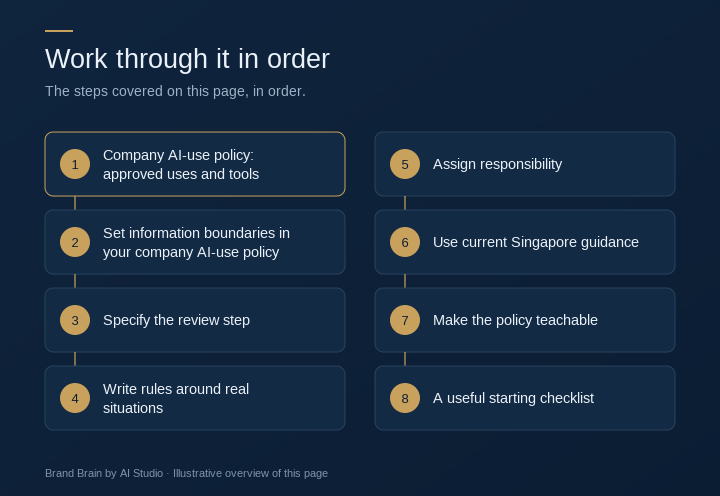
Step 1: Company AI-use policy: approved uses and tools
Name the approved tools or accounts and the work they may support. Examples could include drafting from public company facts, summarising approved internal material or preparing an SOP draft.
Identify who can approve a new tool. Check its current terms and controls before using company information. Approval for one account or use case should not silently become approval for every product from the same vendor.
Step 2: Set information boundaries in your company AI-use policy
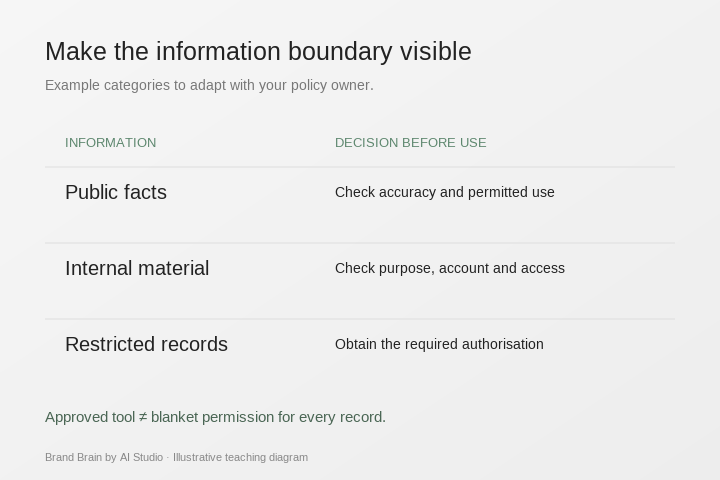
Create a simple classification that fits the business. For example: public, internal and restricted. Explain each with recognisable examples.
Public product information is different from customer records, employment information, financial details or confidential client work. For each workflow, use the minimum relevant information and confirm that access is appropriate.
Removing a name does not automatically make a record anonymous. Consider whether the remaining details can still identify someone.
Step 3: Specify the review step
Tell staff which outputs require human review before use. Examples include customer-facing messages, proposals, public claims, financial commentary and documents that influence important decisions.
Review should cover factual accuracy, source support, missing context, sensitive information and the authority to act. A confident answer is not a substitute for evidence.
Step 4: Write rules around real situations
| Situation | Practical policy question |
|---|---|
| A staff member wants to summarise a client file | Is this material permitted in this approved account for this purpose? |
| AI drafts a proposal | Who verifies scope, figures and contractual terms before sending? |
| A team wants to connect a knowledge base | Which records may each user retrieve? |
| An answer contains an unsupported claim | How is it corrected and reported? |
| A person leaves the company | Who removes access and transfers ownership? |
| A source becomes outdated | Who updates it and checks dependent workflows? |
These are operational prompts for your policy, not a complete statement of legal obligations.
Step 5: Assign responsibility
Name a policy owner and an escalation contact. Give each important workflow a business owner. Explain how staff report an accidental disclosure, a misleading output or an unexpected tool behaviour.
Agree how prompts, outputs and source material are retained or removed, taking account of the business's obligations and the actual tool settings. Avoid a blanket rule that everything must be saved forever.
Step 6: Use current Singapore guidance
The Personal Data Protection Commission published its Advisory Guidelines on Use of Personal Data in Generative AI on 20 July 2026. The guidance covers personal-data use in model development, responsibilities across the generative AI lifecycle and individuals' requests. It links to related PDPA guidance. Read the official PDPC guidance.
Have the person responsible for data protection adapt the policy to the business and its tools. A training template does not establish PDPA compliance.
Step 7: Make the policy teachable
Use a short exercise with realistic examples. Ask staff to decide whether information can be used, what needs review and who can approve the next step. Discuss uncertainty instead of expecting everyone to infer the rules.
Keep the policy easy to find. Review it when tools, data uses or responsibilities change. Connect it to the workflows people use rather than leaving it as a separate file.
Step 8: A useful starting checklist
- Approved tools and accounts are named.
- Permitted uses and information boundaries are explained.
- Review and approval responsibilities are clear.
- Access, ownership and source updates have an owner.
- Staff know how to report a problem.
- The policy has a review date and an accessible location.
Our business workshops include an AI-use policy template and practical review exercises. The aim is to help the team use its Brand Brain with clear responsibilities from the start.
Apply this with your team
Our Team AI Workshop includes a policy template and practical exercises to help staff apply the rules.
Questions teams ask
Does a policy template make us PDPA-compliant?
No. It is a starting point. The responsible person must assess actual data uses, obligations, tools and safeguards.
Should the policy ban all AI?
Choose rules based on actual work and information. Clearly defined permitted uses can help staff make practical decisions.
Can staff paste a client document into an approved tool?
Tool approval alone does not settle that question. Check whether the material, account, purpose and access are approved for that workflow.
Who handles a mistaken disclosure?
Name an escalation contact and an incident process. Staff should know how to report a problem promptly.
When should we review the policy?
Review it when tools, data uses, access or responsibilities change, and keep its owner and current version visible.