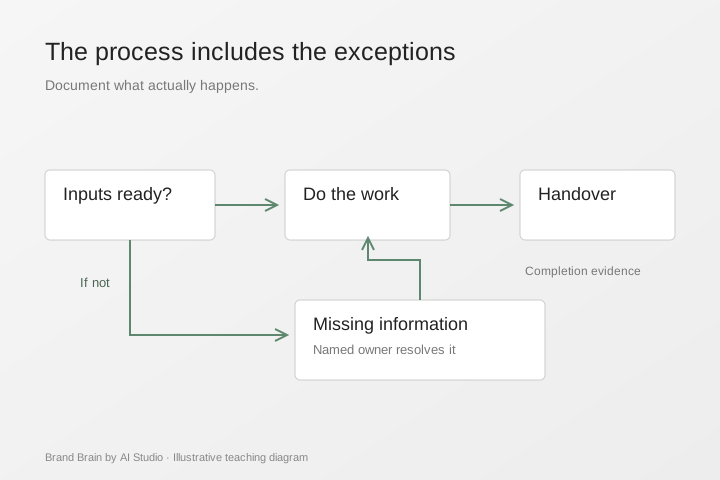
An SOP should capture what the business actually does: the trigger, required inputs, steps, responsibilities, exceptions and evidence of completion. Start with a process that already has a knowledgeable owner.
Step 1: Create SOPs with AI: choose a bounded process
Good first candidates include preparing a customer handover, checking a quotation before approval or onboarding a new project. Avoid starting with a process that nobody agrees on.
Write a one-sentence boundary. For example: “This process begins when a signed project scope is received and ends when the delivery lead accepts the handover.” A clear boundary prevents the document from becoming a general company handbook.
Step 2: Capture the real work before you create SOPs with AI
Ask them to walk through a recent example. Capture the details they might otherwise skip: where a file comes from, which version is authoritative and when they ask for help.
Useful questions include:
- What must be true before you start?
- Which information do you check?
- What order do the steps follow?
- What changes when information is missing?
- Who approves the result?
- How do you know the job is finished?
Use an approved recording or note-taking process if you capture the conversation. Do not put confidential examples into an unapproved tool.
Step 3: Draft a usable structure
| Part of the SOP | The question it answers |
|---|---|
| Purpose and scope | What does this procedure cover? |
| Owner and users | Who maintains it and who follows it? |
| Inputs | What must be available first? |
| Steps | What happens, in what order? |
| Exceptions | What happens when the normal path fails? |
| Approval | Who can accept the output? |
| Completion evidence | What is saved, updated or handed over? |
| Review information | Which version is current? |
Ask AI to organise your source notes into this structure and flag ambiguity. Do not ask it to fill missing business rules from general knowledge.
Step 4: A practical before-and-after example
Illustrative source note: “When a client says yes, send everything to the team and make sure they know the deadline.”
A more useful draft would identify the accepted scope, approved deadline, delivery owner and required access. It would specify where the handover is recorded and who confirms receipt. It would also flag unanswered questions, such as what counts as client acceptance.
The improvement is structural. We have not measured a time saving from this example, and a process owner must still validate the details.
Step 5: Test with a colleague
Ask someone other than the author to follow the draft on an appropriate test task. Watch where they hesitate, ask a question or take a different route. Those moments reveal missing information.
Have the owner review the exceptions as carefully as the normal steps. A polished checklist can hide a serious omission if it assumes every request arrives complete.
Step 6: Connect the SOP to the company core
Store the approved SOP with its owner and review information. Link to the source policies, templates and current service definitions it relies on. Keep the generated working draft separate from the approved version.
When a policy changes, identify the dependent SOPs and update them deliberately. Do not assume that changing one document automatically updates every AI tool or copy.
Step 7: Measure usefulness
Track how long the task takes, how often staff ask for clarification, how many errors need correction and whether the output meets the agreed standard. Keep the task mix comparable.
If the SOP is longer but harder to follow, simplify it. A useful procedure is one the team can find and use in the moment.
Step 8: What to bring to training
Bring one process owner, a real example, existing notes and any relevant templates. The Brand Brain Build Programme can use these materials to create and test one selected SOP workflow, with staff ownership and a maintenance routine.
The business supplies the operational truth. We teach the team to turn it into a process that can be checked and reused.
Apply this with your team
Our guided Brand Brain build can turn one established process into a tested workflow and handover pack.
Questions teams ask
Can AI invent a process for us?
It can suggest a structure, but the business must decide what the process should be. Record assumptions separately from established practice.
Who should check the SOP?
The process owner checks accuracy. A colleague who is less familiar with the task can help reveal unclear instructions.
What belongs in an exception section?
Include known situations where the ordinary path fails, who decides the next step and what evidence should be recorded.
How do we keep versions clear?
Give the current SOP an owner, review date and visible version. Archive superseded copies so staff know which one to follow.
Does an SOP automatically run the process?
No. It describes the work. Automation needs separate configuration, permissions, handling of exceptions and testing.